Create, scan, and analyze assessments with ease
PaperScorer is a complete solution for paper-based testing that bridges the gap between traditional assessments and modern digital analytics. Replacing older hardware? Start with our Scantron alternative comparison.

How PaperScorer works
From creation to analysis in four simple steps
Create Your Assessment
Use our template-based system to quickly create assessments. Customize questions, add standards, and configure settings.
Print & Distribute
Print answer sheets on any plain paper. No special equipment or scantron forms needed.
Scan Responses
Students or teachers scan completed sheets using our free mobile app or any document scanner.
Review & Analyze
View instant results, grade written responses, and analyze performance with detailed reports.
Multiple ways to scan
Whether you're scanning one sheet at a time with a phone or bulk processing with a document scanner, PaperScorer handles it all.
Mobile App
Free iOS and Android app for instant scanning
Document Scanner
Use any flatbed or sheet-fed scanner
Email Upload
Email scanned PDFs directly to PaperScorer
Free Mobile App
Available on iOS and Android
Bulk Upload
Process multiple sheets at once
Email Integration
Email scanned PDFs directly to your PaperScorer account for automatic processing
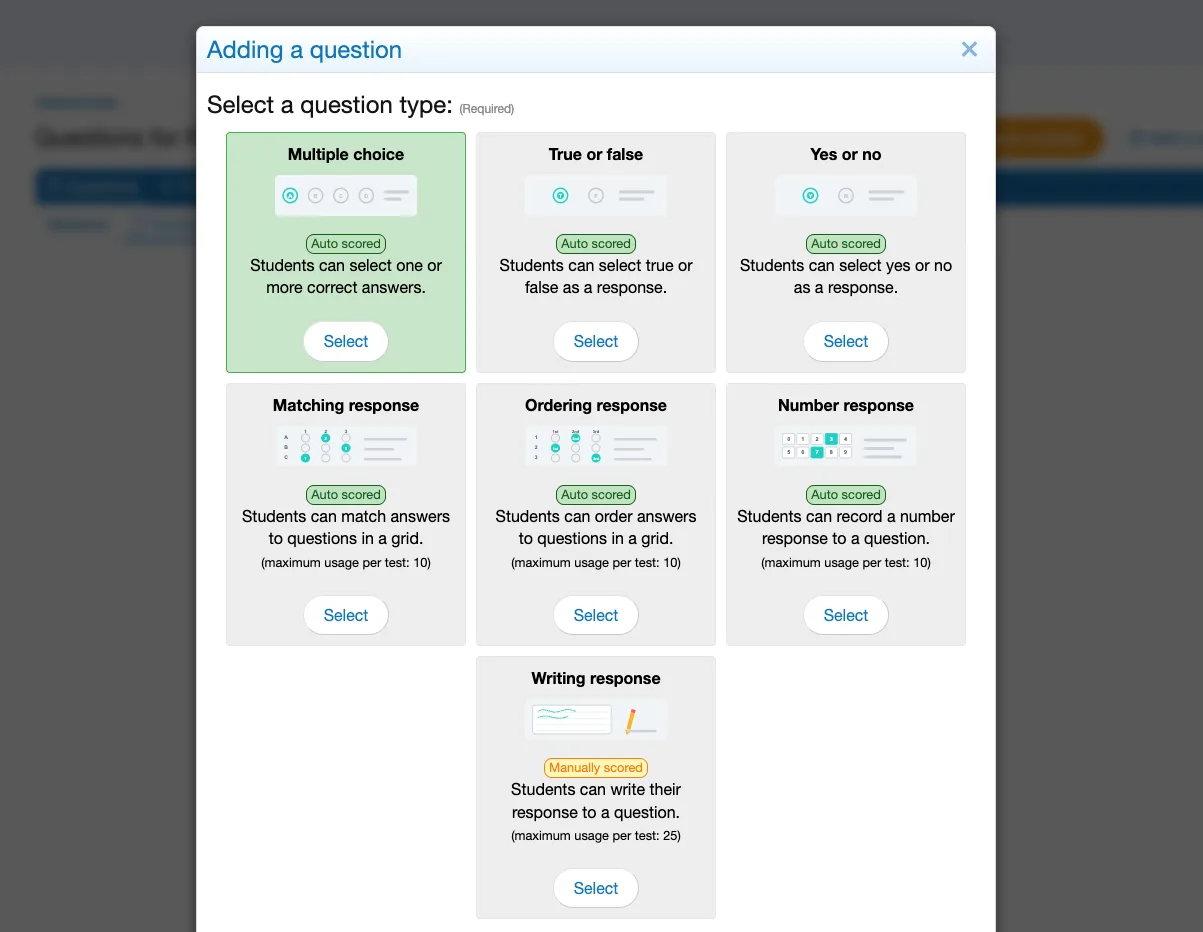
Support for all question types
From multiple choice to written responses, PaperScorer handles any question format you need.
Up to five versions of every test
Generate up to five variants of the same assessment. Question order and answer options are shuffled between versions, so two students sitting next to each other aren't looking at the same sheet.
- Versions labeled A-E or 1-5, whichever you prefer
- The version is printed into the bubble grid and detected at scan time
- Every version scores against the same source assessment — no second answer key
- Results report in the original question order regardless of version
Print answer sheets in 13 languages
Pick the language when you print. The instructions and labels on the answer sheet are translated for you — the assessment, the scanning, and the gradebook sync all stay exactly the same.
Useful for multilingual classrooms, newcomer and ELL programs, and schools running PaperScorer outside the United States.
Written responses, scored consistently
The bubble grid grades itself. The rest of the test is where grading drifts — between students, between class periods, and between teachers marking the same assignment.
Rubrics
Score a written response against a rubric instead of assigning a number and hoping it means the same thing on Friday as it did on Monday.
- Basic rubrics score the response on a single scale
- Advanced rubrics score against multiple named criteria
- The same rubric applies to every student on the assignment
- Criterion-level scores roll into the same reports as auto-graded items
Performance bands
If your school reports proficiency rather than percentages, define the bands once and let every assessment map into them automatically.
Bands are yours to name and colour — the labels above are only an example.
Not everything on paper is a test
Surveys are a separate thing you can build and print in PaperScorer — climate surveys, course feedback, training evaluations, exit polls. They run through the same scanning pipeline as an assessment, and produce response breakdowns instead of grades.
- Respondents are not student records, so nothing lands in a gradebook
- Per-question response breakdowns rather than scores
- Scan with the mobile app, a document scanner, or email upload
- Full scan history, the same as assessments
Example response breakdown
Powerful features, simple interface
Everything you need to streamline assessment creation, scanning, and analysis.
Quick Create Assessments
Start with templates and customize for your specific tests. Create assessments in minutes, not hours.
Multiple Question Types
Support for multiple choice, true/false, yes/no, numeric response, matching/association, ordering (all auto-scored), and written responses.
Standards & Tagging
Tag questions with Common Core standards or custom tags for detailed performance tracking.
Manual Grading Interface
User-friendly grading screen for written responses with easy error correction.
Mass Scoring View
Excel-style view for quickly scoring multiple questions across many students.
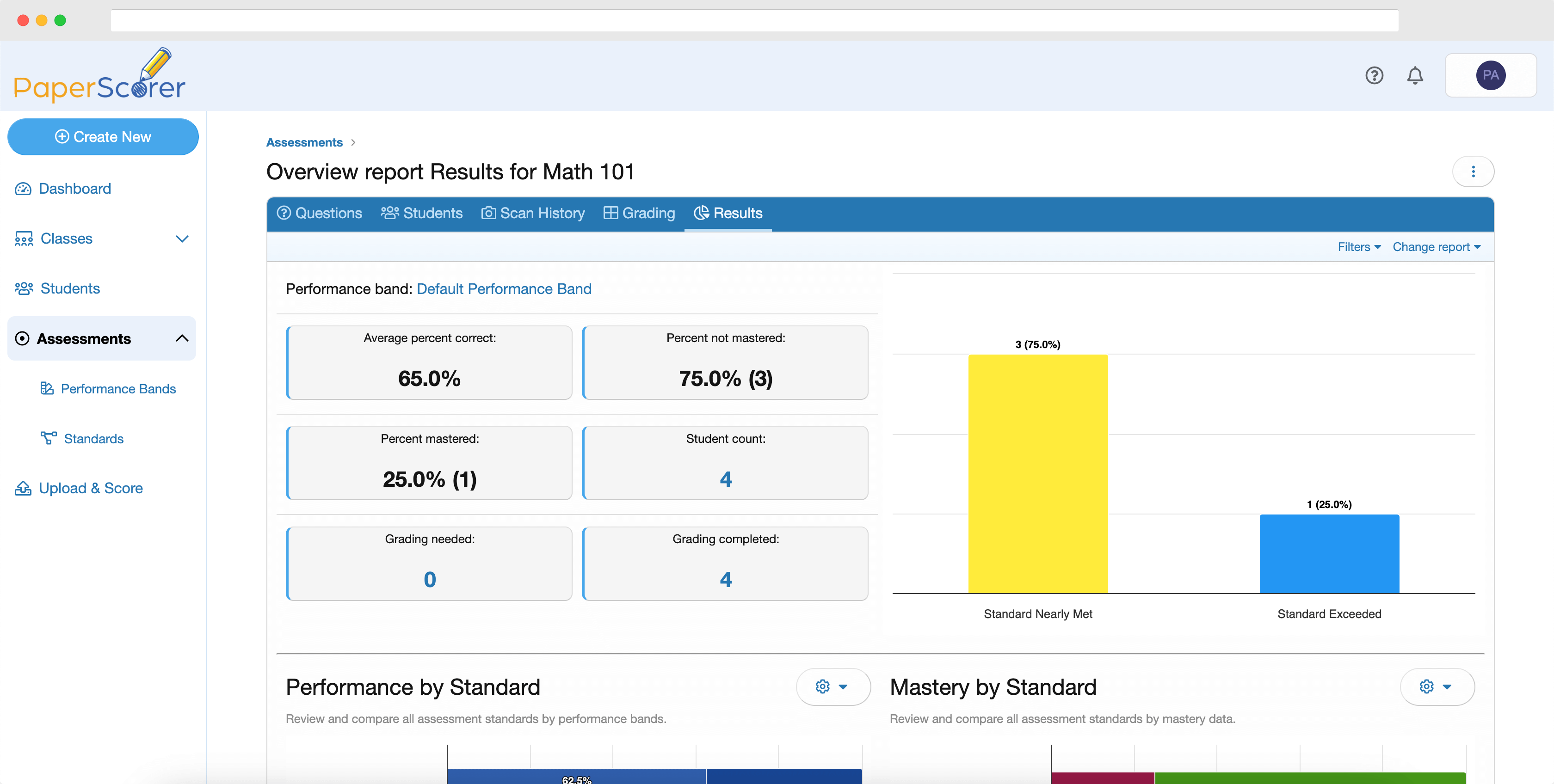
Overview Reporting
Pre-built reports showing performance breakdowns by standards, tags, and lowest-performing areas.
Rubric Scoring
Score written responses against basic or advanced multi-criteria rubrics instead of a single point value.
Performance Bands
Map raw scores to labeled, color-coded proficiency levels for standards-based grading and reporting.
Import From a Document
Upload a PDF or Word test you already wrote and PaperScorer detects the questions for you to review. Correct answers are imported only where the document marks them — never guessed. Costs no tokens.
Your Item Bank
Every question you write in a managed assessment can be collected and reused. Search it, filter by standard or tag, and pull items straight into a new test.
Paper Surveys
Build and print scannable surveys that collect responses without creating student records.
Data-driven insights
Go beyond simple grades. PaperScorer provides detailed analytics to help you understand student performance and improve instruction.
- Performance breakdown by standards and tags
- Identify lowest-performing questions
- Response distribution analysis
- Performance bands that map scores to proficiency levels
- Track progress over time
- Export data for further analysis
Ready to simplify your grading?
Create a free account and get 100 scans to try PaperScorer with no obligation.